1) Information: This listserver is for the use of current, dues-paying members of the Chrysler 300 Club International.
It is not open to the general public.
1A) Invitation: In the old days, account managers could add you to the list.
This has changed. Now we send you an email with an invitation to join.
It will look something like this:
When you click the "Join this group!" button,
you will go to the Chrysler 300 page where
2) Purpose:
The purpose of the list server is to provide communication between
members on any subject related to Chrysler 300 cars.
This includes technical information, problem solving,
parts for sale, parts wanted, cars for sale, and cars wanted. 3) Rules: 4) Message Size: The Yahoo server does not restrict message size
although JPEG's or attachments will not pass through the list server. 5) Virus Protection : It is the responsibility of the member using this list server to provide their own virus protection program.
Such programs are available from Symantec, McAfee, and others. 6) To Send An Email : The address is: Chrysler300@yahoogroups.com If you are a registered Yahoo user, you can change how you receive and view your e-mail
by yourself at any time. If you are not a registered Yahoo user, you can request
assistance from the administrators listed below.
9) To Change Your Email Address: You can't change your address yourself. Please contact any one of the list administrators below and they will process the change. 10) Bounce Notice: Yahoo detects malfunctions with delivery of your email messages. If messages are returned from your address, Yahoo places your account in their 'bounce file' and sends you a 'reactivation notice'. If you think you are not receiving any mail through the server, look for a reactivation notice from Yahoo, reply to it, and your mail service should resume. If your attempts to reactivate fail, contact any one of the list administrators below.This is what a Bounce Notice looks like: Hello, You belong to one or more email groups provided by Yahoo! Autos (autos.groups.yahoo.com). Email from these groups can be recognized by looking for a group name in the message Subject line, like [pet-owners] or [music-fans]. Recently, messages sent to you from Yahoo! Autos have been returned to us as undeliverable. To prevent any problems with your email service, we have temporarily turned your Yahoo! Autos account OFF. If you are reading this message now, the delivery problem appears to be fixed. However, we won't know that the problem is fixed until you tell us. To turn your Yahoo! Autos account ON: - Please REPLY to this message. Send that reply back to us without changing anything. OR - While connected to the Internet, click on the following Web link (or copy and paste it into your Web browser and hit the RETURN key): http://autos.groups.yahoo.com/unbounce?adj=110448377,32727&p=1066832613 Once we get a response from you, we will turn your Yahoo! Autos account back ON, and you will begin to receive messages from your groups again. After you respond, you can read any messages you might have missed while your account was off by visiting: http://autos.groups.yahoo.com/mygroups Thank you for using Yahoo! Autos! Yahoo! Autos Customer Care Your use of Yahoo! Autos is subject to http://docs.yahoo.com/info/terms/ 11) List Administrators : If you have any problems, complaints, or suggestions please e-mail Bob Merritt at bob@simplexco.comOr Don Warnaar at 300country@email.msn.com 12) Message Archives: The easiest search is provided by our friend Dave Stragand at the Forward Look. Use this page http://www.forwardlook.net/300-archive/search.htm or this page http://www.forwardlook.net/300-archive/ The other way is to use the archive contained within the Yahoo
list server.
You need to have a Yahoo account and password to access the archives. Your email address must be the same as the one you subscribed to the list. If you already have a Yahoo username and password,
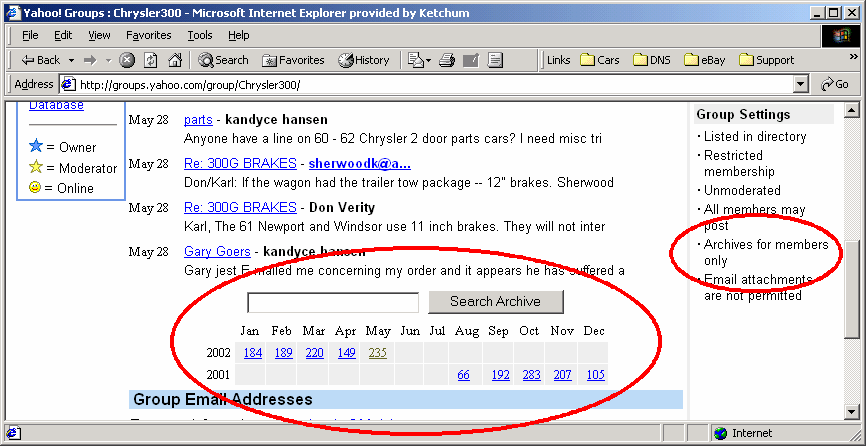
make sure to associate that email address with the username as described below. When you have completed these requirements, you will see the picture below and you are all set to access the archives:
|